
You’re building the book.
You asked one AI for the outline and another for the research, and now you paste both into a third so it knows what the book is about.
The Quiet Scribe Suite is eight AI workers in one folder on your computer. Start with one idea. You answer their questions and approve each step, and the Conductor passes the work from one worker to the next. Between them they write articles, posts, email and scripts, make social images and carousels, and render text-motion video from your finished writing. The list below says which path has run end to end. You stop being the one who carries the work between tools.
Early access. The button below starts with Scribe Hands.
Get Scribe Hands, founding beta →
Founding beta of Scribe Hands. Price and details are on the next page.
You asked one AI for the outline and another for the research, and now you paste both into a third so it knows what the book is about.
The chapter is finished and the cover is next, so you explain the book to an image tool again, from the top.
You explain it perfectly out loud, then lose all of it the moment you open a blank document.
The book is done and the launch needs a description and some posts, so you paste the manuscript into a new window and explain your readers again.
The Suite makes the book. Scribe Hands is the small tool that publishes what you’ve finished. You name a finished video and it uploads it to your YouTube channel with one typed command, or an image with its caption to Instagram once the image sits at a public web address. Then a second command checks the account directly and tells you whether the post is really there.
The Suite’s Marketing worker writes launch text and posts nothing. Posting a finished video or image is Scribe Hands’ job. You don’t need the Suite to use it. It’s a beta that has only been run on a Mac so far, and it arrives as a ZIP you run with commands.
Founding beta of Scribe Hands. Price and details are on the next page.
Insight
You are the connective tissue between your tools, and nobody hired you for that second job.
Every AI tool you already have is genuinely good at its one job. None of them know what the other one just did. So you tell Research what Content already decided. You paste the chapter into Design’s brief. You explain the audience again for the caption.
The Conductor passes the work from one worker to the next, and what each one makes sits in one folder, where Builder reads Content’s chapters and Design’s cover. You stay the one who decides. You stop being the one who carries it between them.
They live in a folder you can open. Each one does a single job, the Conductor passes the work on, and each stops where it says it stops. You direct it — nothing here decides anything about your book without you.
The way in, not the first step. Walk straight to the worker you want, or come here when you don’t know which way to go. It runs the others and checks their work.
Where it stops: it never writes your book. It routes.
Reads what’s already been said on your subject, reads your own material back to you, and checks the angle is actually yours before you spend a month on it.
Where it stops: it finds and checks. It does not decide what you think.
Writes you the questions before a word of the book exists — then, once you’ve answered them, writes the material in your voice. It shows up twice, and the first time is the one that unblocks you.
Where it stops: your words, your order. It drafts; you decide.
Turns the talking into material you can write from: the through-line, your answers cut into labelled sections, the contradictions and the gaps flagged.
Where it stops: it may cut a stumble. It may not improve a sentence.
The cover, and the visual surface of the document. Three tries, until it looks like something you’d pick up.
Where it stops: the cover is yours to approve, every time.
Assembles the finished document out of the parts the others made — a PDF and an EPUB, files that open on anything.
Where it stops: it makes one free-chapter landing page when you ask for it. A multi-page website for the book isn’t built.
Takes a finished chapter, synopsis or report and turns it into typographic motion — every word verbatim, nothing invented.
Where it stops: you own it the day you get the folder. It needs ffmpeg installed before it runs.
The launch kit for the finished document — the description, an announcement, a set of posts, and a one-page plan for where to put them. It reads your voice file.
The description, the announcement and the posts are written from the same voice file the book was, so you edit them. You don’t start them.
Where it stops: text out. It posts nothing, schedules nothing, connects to nothing.
The Marketing worker writes into one folder per book: a description, an announcement, posts and a one-page plan.
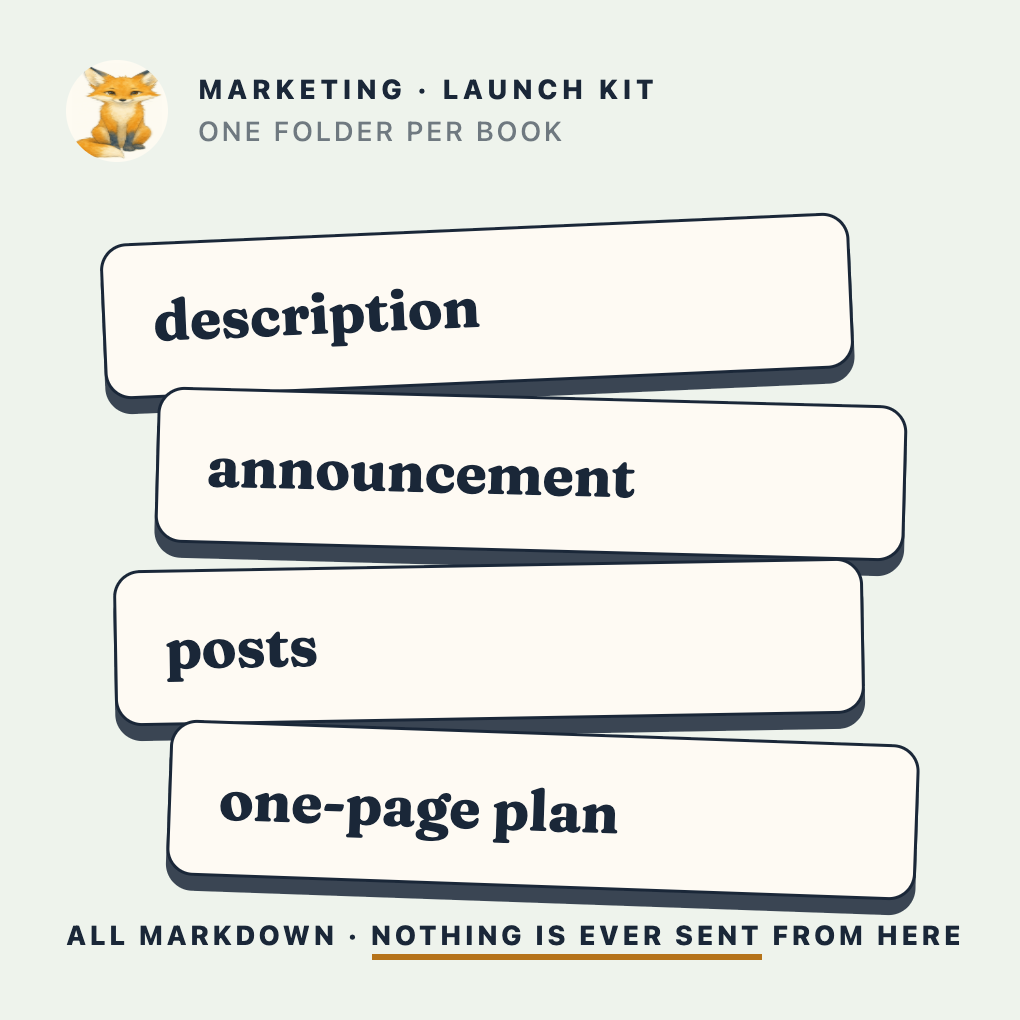
Diagram of the folder Marketing writes into. In this download the folder starts empty.
This is for you if you have something you actually know, and the thing you want to make hasn’t happened because of everything around it. You want help doing the work, not help skipping it. You’d rather it still sound like you than sound polished.
This isn’t for you if you want to type one line tonight and have a book by morning. That exists. It isn’t this, and it won’t sound like you.
Everyone else shows you the demo. This is the list I’d want if I were the one deciding — including the parts that would make me wait.
I published three books the old way, over a year on each. The five after that took forty-five days between them; the most recent took three.
Scribe Hands is where early access starts. The button takes you to its page, where the founding-beta details and its price are. This page doesn’t sell the Suite on its own.
Early access means the Suite is still being finished. The limits are listed above in full, and they are the list I’d want to read before deciding.
Get Scribe Hands, founding beta →Founding beta of Scribe Hands. Price and details are on the next page.
For one chapter, often yes. A prompt carries what you typed into it and nothing else, so the trouble starts when the book needs a second tool or a second week. The Suite keeps your answers, your brand file and each worker’s output in one folder. Content’s chapters and Design’s cover go to Builder, and you aren’t the one pasting between them. The workers think with your own Anthropic key, so you keep the model you’d use anyway. What you add is the folder and the handoffs.
It’s built to work from your words, not from a general idea of your subject. You answer the questions out loud, Transcriber turns that into material and may cut a stumble but may not improve a sentence, and Content writes chapters from those answers in your order. You read every chapter, and the cover is yours to approve. One honest gap: Transcriber logs what it cut, and nothing yet checks that log against your recording.
Your files stay in a folder on your computer. What the workers send to Anthropic, under your own key, to write goes out, and so do the web searches Research makes when you ask it to look something up. If you use Scribe Hands, it sends your posts to YouTube or Instagram. There’s no Quiet Scribe account to log into and no dashboard.
The book path runs end to end today: your answers to a finished PDF and EPUB, with a cover. It isn’t finished in the ways the list above says: no printer file, no multi-page website, and the SOP, training and analysis shapes aren’t built. Audio takes a separate setup, and nothing checks Transcriber’s cuts. That’s the list I know of.
No, and it’s built so it can’t. You answer the questions out loud — on a walk, in the car, wherever you actually think. Transcriber turns that into material and may cut a stumble; it may not improve a sentence. Content writes chapters from your answers, in your words and your order. You are the source of every line and the last word on all of them.
No. It’s a folder of workers that sits on your own machine. No account, no dashboard, no trial that expires. You can open every file in it and read the instructions each worker follows — they’re plain text, and when one is wrong you fix it with a keyboard.
There’s no price on this page, on purpose. The price of Scribe Hands is on its own page.
Before you start. Two things to set up first, and setup walks you through both. Node runs the Suite’s own window, so nothing opens without it; it’s a button on nodejs.org and you never open it yourself. An Anthropic API key is what the workers think with. The key is billed by what you use, not a flat monthly fee: you attach a card and set the limit in Anthropic’s console. The Suite itself has no subscription. A few parts need one more thing each. Audio is a one-time setup in Terminal (a speech engine, ffmpeg and a speech model, a few hundred megabytes), and until you run it you hand Transcriber text. Video needs ffmpeg installed before it runs. Design, Builder and Video need a local Chrome or Chromium; setup does not install it. A typographic cover needs only Chrome; art-backed covers aren’t built in. The Suite opens from a Mac file and its setup is written for a Mac. Nothing in the download is built for Windows or Linux.
It never was. You were doing seven jobs alone, in the evenings, after the real day was done. Losing at that isn’t a character flaw — it’s arithmetic.
Get Scribe Hands, founding beta →Founding beta of Scribe Hands. Price and details are on the next page.
The Quiet Scribe Suite. Early access starts with Scribe Hands.
Get Scribe Hands, founding beta →