
Add your Anthropic key to your Suite.
Your Suite's workers think with Claude, and your Anthropic key is what lets them. It is the one thing in the Suite that costs money: you pay Anthropic for what your workers use, billed to your own Anthropic account. It takes about five minutes.
Make a key at Anthropic.
Sign in at console.anthropic.com, open API keys, create a key and copy it. In the same console you can add credit and set a spend limit, so you choose how much the workers can use.
Open your Suite and go to Connections.
Double-click start-shell.command in your Suite folder. Along the top of the window, Connections is the second item, right after Start. It is also one of the choices on the first screen.
Paste your key and press Save.
Paste the key into the Anthropic key box and press Save.
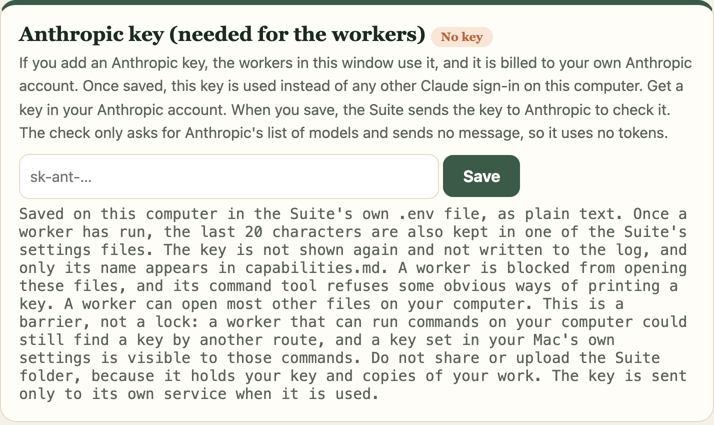
The Connections screen, before a key is saved.
When you press Save, your Suite checks the key with Anthropic by asking for its list of models. That sends no message and costs nothing, so a wrong key shows up straight away.
The first worker that needs it will ask.
You can look around your Suite without a key. The first time a worker needs to think, it asks for the key and you paste it there. It is the same box.
Use Claude Code instead.
You can open the Suite folder in Claude Code, signed in however you normally sign in, and work from there without saving a key. The CLAUDE.md at the top of the folder tells Claude Code how to begin. If you save a key in the Suite's own window, the window uses that key instead of any other Claude sign-in on your computer.
If something goes wrong
My key was refused
Usually a copy that picked up a stray space, or a key that has been revoked. Make a fresh one in the console and paste again.
It says I am out of credit
The key is fine; the account behind it has run out. Add credit at console.anthropic.com and carry on. Nothing you have written is affected.
I do not want to put a card in yet
Then look around without one. Every screen and every file is readable without a key; only the thinking needs one. Or use Claude Code, signed in however you normally sign in.